Managed durable event bus · people and AI agents get the same events
Wire events into your app — and its agents.
Publish once; people and AI agents get the same events. SSE, WebSocket and webhooks are at-least-once, replayable within the retention window. Underneath is a managed durable event bus — you don't run Kafka, Redis or polling loops.
5 minutes to connect · No credit card · MCP / SDK / curl all work
What you can build
Four scenarios you can ship within a day
Five common shapes of event delivery. Each card states its own limits, so you don't have to open the docs to find out.
{ }
01 / AI-NATIVE
AI agents subscribe to events and react
Paste a snippet of config into Claude Desktop / Cursor and your agent watches your streams all night: orders handled the moment they arrive, alerts reported the moment they fire — no polling or relaying in between. Underneath is MCP's watch_topic long-lived loop.
Why MsgMesh: native MCP access for agents — no event bridge to build for them.
⇄
02 / REALTIME
Realtime chat / multiplayer collaboration
Chat, co-editing, live interaction — messages arrive in real time. Inside one topic, room separates groups; publishing and SSE / WebSocket subscriptions can both be scoped to a room, so you don't need a topic per group. Browsers connect with short-lived tokens; long-lived keys stay on your backend.
Why MsgMesh: room routing and short-lived credentials are handled by the platform; reconnection and dedupe live in the official SDKs — that's a whole WebSocket stack you don't build. presence is aggregated per topic, not per room.
↪
03 / WEBHOOK
App event notifications / webhook relay
Move notifications from system A to system B: at-least-once, with automatic retries; anything that exhausts its retries lands in a dead-letter queue you can inspect and re-send. If you supply a secret when registering the webhook, each delivery carries X-MsgMesh-Signature so the receiver can verify it.
Why MsgMesh: no retries / DLQ / signing to write yourself, and no queue to run.
$_
04 / VIBE CODING
Let the agent take over provisioning
First issue an admin key on the panel's Keys page and paste it into your MCP config (the management tools need it), then in your AI IDE just say “create a key for this service that can only send and receive orders, and create the topic while you're at it” — the agent provisions downstream with create_key / create_topic, so you never go back to the panel.
Why MsgMesh: governance actions (creating topics, minting keys) also run over MCP, so after the first key you don't have to come back to the panel to expand.
Plans & pricing
See exactly what it costs
Start free, then move to usage-based pricing as you scale — limits fully public; final pricing will be announced at launch.
🚧 Free during beta with all features open. The plans and limits below are a planned direction and may change before launch based on real usage and feedback.
Free plan: 1M message operations per period, 20 requests/sec, 5 topics, 3-day retention — free during beta, no payment needed. PAYG usage-based: 2,000 requests/sec, 30-day retention, managed functions included, pricing announced at launch (lower unit price at higher volume), no monthly fee, no lock-in.
Only the free plan is available during beta, and it needs no payment. The usage-based pricing above is a direction, not a product — the payment channel is not open, and switching to it now would leave you unable to publish. Prices and payment methods will be announced here when it opens.
Into your existing system · 5 min
Send your first event
Just watched events stream live in the Demo? Wire the same thing into your existing app or backend — pick any of the three paths below. Snippets are pulled live from the platform, always matching the current API. No system to wire into yet? Jump to the standalone examples below and run one first.
No key yet? After signing up, issue one on the panel's Keys page and set it as the MQ_API_KEY environment variable — for a send/receive key pick scope key (custom) and tick publish + subscribe. The MCP path needs that key too: only once you hold an admin key can you have the agent issue narrower keys downstream with create_key.
No system needed · runs standalone
Two official examples that run as soon as you clone
The snippets above are the minimal change to an existing system; these two examples are the opposite — each is a complete project on its own. No app of your own needed: fill in one API key and it runs standalone on your machine. On every commit, CI installs, builds, and actually loads each one in a browser.
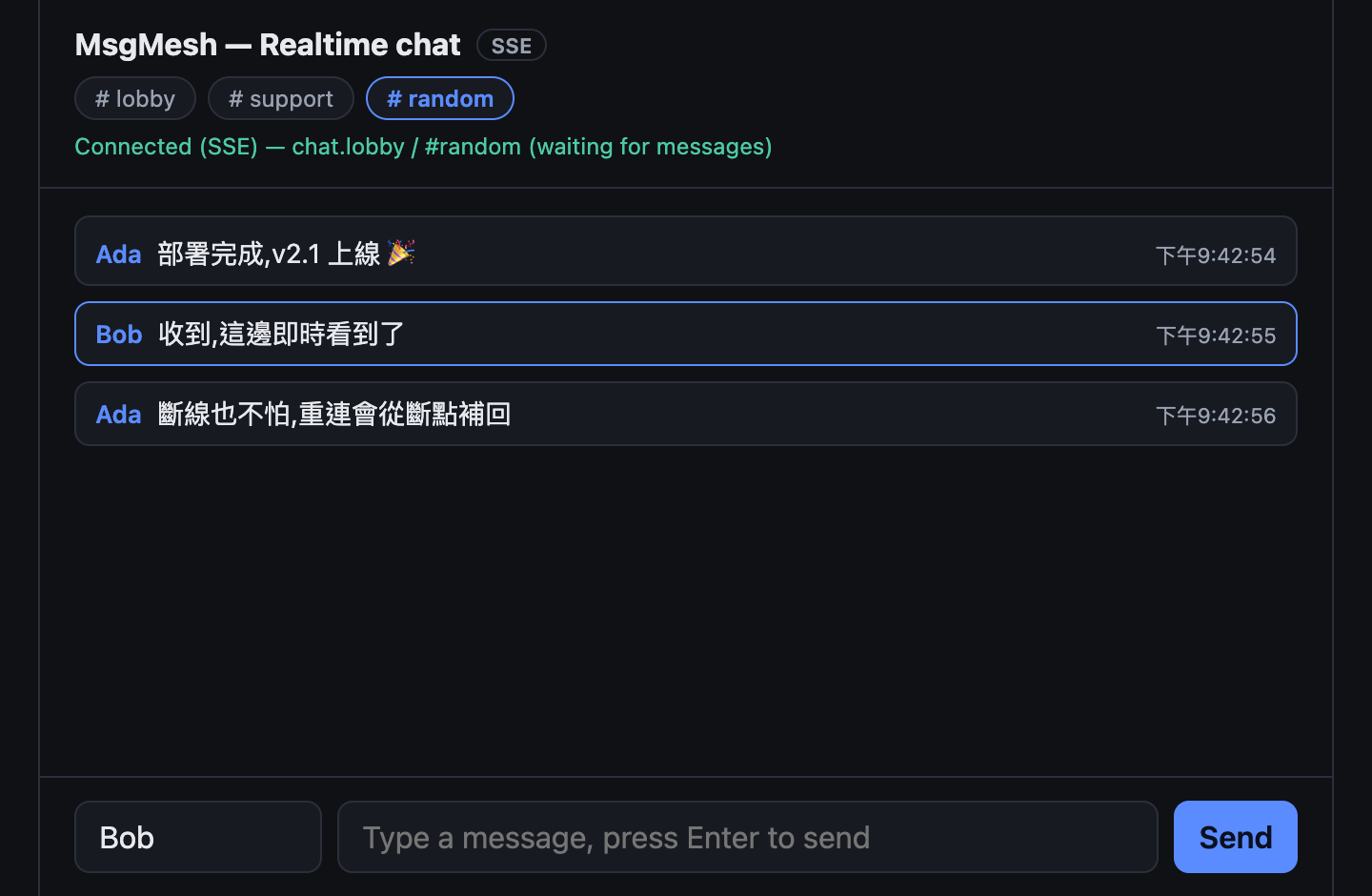
Web chat roomchat-web
No long-lived key in the frontend. Ships with a minimal token-broker backend: the long-lived key lives only in the backend, and the frontend gets 5-minute short-lived scoped-down tokens; the token's room list is enforced by the platform — subscribing beyond it returns 403. SSE receiving, multi-room isolation, and cursor-based catch-up after a disconnect.
git clone https://github.com/LukeLogix/msgmesh-examples
cd msgmesh-examples/chat-web
npm install
cp .env.example .env
npm run build
node --env-file=.env server.js
Open two tabs and chat with yourself to see realtime delivery. .env needs a key that can both publish + subscribe.
The event layer for AI agents / backends. A Node script that waits on a topic with subscribe() long-polling and handles each event as it arrives; it reconnects with backoff on disconnects and only stops when the key is revoked. Consumes the whole topic (firehose), no room filtering.
Once running it prints a line per event — publish one with the curl above or chat-web and watch it appear. The key only needs the subscribe capability (smallest blast radius).